Essential Video Skills: From Shooting to Sharing
Video content has become quite essential in modern marketing. By 2026, over 90% of businesses will include video in their digital strategy, and people now spend an average of 17 hours per week watching online video. With so much video content available, creating content that stands out requires getting every step of the process right. In this guide, we’ll walk you through the full video process product, from planning and filming to editing and sharing, with practical tips to increase your team’s video capabilities.
Plan Your Video Project (Pre-Production)
Every successful video begins long before the camera starts rolling. Pre-production is all about planning and strategy.
Get your target audience
Start by defining your video’s purpose and target audience. For example, are you creating a product demo for potential customers or a brand story for a general audience? Clear goals will shape your creative approach. It’s wise to tie your video to a specific marketing objective or stage of the funnel (awareness, consideration, conversion) so every decision supports that goal.
Develop your script
Next, develop your concept and script. Brainstorm ideas that convey your message compellingly, then write a script or outline. Even if your video is mostly visual, having a written plan ensures you cover all key points. For more visual projects, create a storyboard, a simple sequence of rough sketches or frames, to map out scenes. This helps you organise shots and anticipate how the story will flow, saving time later.
Schedule & Budget
Don’t forget the logistics. Scheduling and budgeting are part of planning, too. Pick a realistic shoot date and build a production schedule, including time for setup, filming, and breaks. Scout locations and secure any needed permissions or permits. Line up the right equipment (cameras, lighting, microphones) and props well in advance. If your video involves on-screen talent or a presenter, arrange casting or briefing sessions, so everyone knows what to do on the day.
Most importantly, prepare thoroughly. Good planning helps you stay on budget and on schedule. There’s a reason pre-production often takes longer than filming; careful preparation is key to a smooth shoot and an engaging final video.
Mastering Video Shooting Skills on Set
When it’s finally time to film, great video shooting skills will make all the difference. Production (the shoot itself) is where your planning comes to life.
Here’s how to make every frame count:
Composition & Framing
Treat each shot like a photograph. Use the rule of thirds to position important subjects off-centre for a pleasing composition, and pay attention to your backgrounds. Make sure nothing distracting is lurking behind your subject.
If you plan to repurpose footage for multiple platforms, frame with flexibility – leave room for cropping vertically or square so your content fits Instagram, YouTube, Facebook, and other channels. Different platforms prefer different aspect ratios, so shoot with those end uses in mind.
Lighting
Good lighting separates amateur video from professional. Wherever possible, use natural light or additional lighting kits to ensure your subject is well-lit without harsh shadows. Soft, diffuse light (for example, from a window or softbox) tends to be most flattering.
Always check your exposure settings, so footage isn’t over- or underexposed. If you’re shooting outdoors, avoid mixing light colour temperatures (like cool daylight and warm indoor bulbs) unless you’re aiming for a specific look.
Steady Shots & Movement
Nothing ruins footage faster than unwanted camera shake. Use a tripod, monopod, or gimbal stabiliser for steady shots, especially for interviews or static scenes.
If the video calls for handheld movement, practice smooth motion or consider using camera rigs to minimise shake. For dynamic scenes, plan your camera movements (pans, tilts, dolly shots) ahead of time and rehearse them for more polished results.
Sound Quality
Professional video isn’t just about visuals; audio matters just as much. Poor sound can make viewers switch off, so use a decent microphone (a lapel mic for speakers or a shotgun mic for general sound) rather than the camera’s built-in mic.
Monitor audio levels during the shoot using headphones to catch any issues like wind noise or background hum. It’s often wise to record a bit of room tone or ambient sound at each location; this helps smooth out edits in post-production.
B-Roll & Multiple Takes
Always capture more footage than you think you need. Get B-roll shots, extra cutaway footage of objects, surroundings, or close-ups, to better the story and cover any edits.
For every key scene or line, take multiple shots and angles. Shoot wide, medium, and close-up versions of important actions or interviews. These extra options will be a lifesaver in editing, giving you the flexibility to cut on action or hide any mistakes.
On-Set Attention to Detail
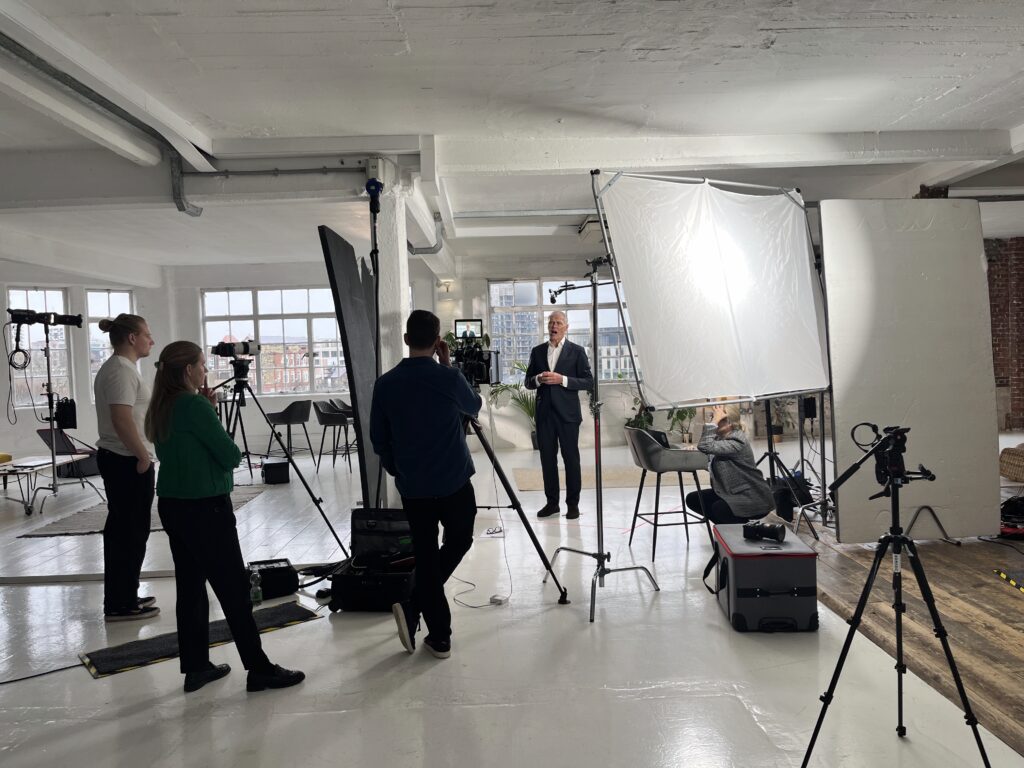
A Nomadic UK videographer adjusting a camera rig on location demonstrates how thoughtful framing, steady camerawork, and attention to lighting ensure every shot looks professional. During the shoot, keep a keen eye on details within the frame, from the positioning of your subject to the consistency of props and backgrounds (continuity).
If something isn’t working, don’t hesitate to do another take. It’s far easier to reshoot a scene immediately than to fix problems later in editing. Stay adaptable too, weather changes or unexpected noise might force a pause or creative workaround. A skilled videographer remains calm and finds solutions, whether that means moving a scene indoors or re-angling lights to reduce glare.
Make the Most of Every Shoot
Above all, maximise your on-set opportunities. You’ve gathered the team, gear, and talent, so use them fully. Try that extra creative shot or alternate line reading while you have the chance. The footage you capture now is the raw material for your final video, so aim for quality and variety. With strong shooting skills and a bit of on-set creativity, you’ll come away with footage that truly tells your story.
Honing Your Video Editing Skills (Post-Production)
Once the cameras are off, the project moves into post-production, this is where your video editing skills take centre stage. Editing is often where a good video becomes great. It’s your chance to shape the narrative, eliminate flaws, and add polish so that the final product shines.
Organise Your Footage
Before diving into editing, start by organising your clips. Load all footage into your editing software (such as Adobe Premiere Pro, Final Cut Pro, or DaVinci Resolve) and review each clip carefully.
Rename files or sort them into folders by scene or type, A-roll, B-roll, audio, and graphics, to stay efficient. This logging process might feel time-consuming, but it will save hours later when assembling your story.
Build a Strong Rough Cut
Begin with a rough cut. Lay out your best takes in order based on the script or storyboard, focusing on story flow rather than perfection. Check that the sequence of shots makes sense and keeps the viewer engaged.
Trim away unnecessary pauses or mistakes. Don’t be afraid to cut ruthlessly. Pacing is key, and concise videos tend to perform far better than long, meandering ones.
Refine the Edit and Add Graphics
Once your rough cut is complete, refine it into a fine cut. This involves smoothing transitions, tightening trims, and maintaining visual continuity between shots. Use techniques like cutaways, overlaying B-roll on jumpy edits to keep the video fluid.
At this stage, add text overlays, titles, or graphics such as captions and callouts to reinforce key messages or brand elements.
Perfect Your Audio Editing
Great audio elevates your video’s professionalism. Balance dialogue and narration against background music so that speech remains clear and easy to follow.
Use fade-ins and fade-outs to smooth transitions, and apply noise reduction or equalisation where needed. Choose music tracks that fit the mood and ensure you have the proper usage rights. If possible, align cuts with the rhythm of the soundtrack for added impact.
Adjust Colour and Lighting in Post
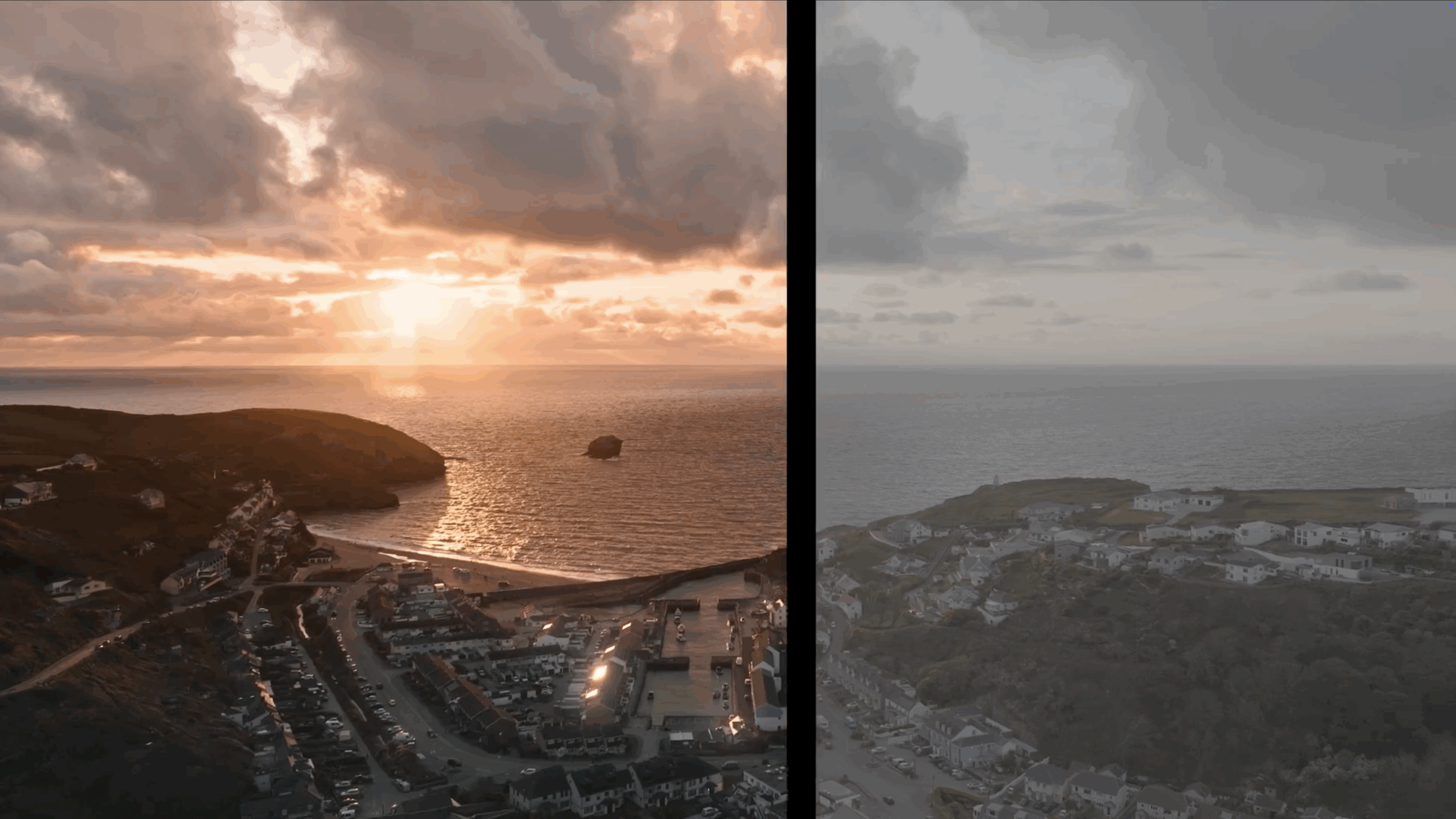
Next, focus on colour grading. Start with basic colour correction, balancing white tones and fixing exposure, to ensure consistency between shots.
Then, apply a creative grade to enhance the mood: add warmth for a friendly, inviting tone or cooler hues for a sleek, modern aesthetic. Be sure to use British colour spelling in any on-screen text or graphics to maintain consistency for a UK audience.
Add Finishing Touches
Bring your project together with final visual effects and graphics such as animations, logo reveals, or lower-thirds with names and titles.
If the video is for marketing, include a clear call-to-action or branded outro. Throughout this stage, ask yourself whether each effect serves the story or distracts from it, simplicity and clarity usually win.
Review, Refine, and Get Feedback
Editing is both an art and a science. It often takes several rounds of refinements and fresh eyes to get it right. Take breaks to reset your perspective, and invite feedback from someone uninvolved in production.
Ask them where their attention drifts or if anything feels unclear; their reactions can highlight areas that need tightening before the final export.
The Power of Great Editing
Ultimately, the goal of editing is to deliver your message clearly and memorably. Video remains one of the most powerful storytelling tools, viewers retain up to 95% of a message when they see it in video form, compared to just 10% when reading text.
Sharing and Optimising Your Video Content
Once your video is complete, the next challenge is getting it seen by the right audience. A strong distribution and optimisation strategy ensures all your hard work pays off, helping your content reach, engage, and convert.
Choose the Right Platforms
Start by identifying where your audience spends time.
- YouTube remains the second-largest search engine and is perfect for long-form, educational, or storytelling videos.
- Social platforms like Instagram, Facebook, LinkedIn, and TikTok are ideal for short, attention-grabbing clips that boost brand visibility.
- For B2B campaigns, embedding videos on your website or blog can improve engagement metrics and SEO performance.
Each platform has its own nuances, tailor your upload to suit its audience and format.
Optimise for Each Channel
Before publishing, adapt your video for the platform’s specific requirements. For example:
- Instagram Reels and TikTok: vertical 9:16 format, 15–60 seconds.
- YouTube and websites: horizontal 16:9 format, typically 1–10 minutes.
Export using quality settings without inflating file size, 1080p HD in MP4 format works well across most channels. For premium content or YouTube uploads, 4K can enhance clarity and brand perception.
Craft Optimised Titles and Descriptions
Don’t let a great video go unnoticed. Use keyword-optimised metadata to make it discoverable. Include phrases like video shooting skills, video editing tips, or relevant industry keywords in:
- Titles and descriptions – concise but keyword-rich.
- Tags and hashtags – to categorise content effectively.
- Thumbnail images – eye-catching visuals that summarise your message at a glance.
Adding closed captions or subtitles is also worthwhile. Not only do they improve accessibility, but they also increase average watch times, especially since many users view videos with the sound off.
Engage and Analyse
Once published, treat your video as a living piece of content. Engage with viewers in the comments, encourage sharing, and note which segments spark the most reactions.
- Use platform analytics to track:
- View count and retention rates
- Watch time and click-throughs
- Audience demographics and engagement
If viewers consistently drop off at certain points, it may signal that pacing, tone, or structure needs refining in future edits. Continuous analysis turns each upload into a learning opportunity.
Repurpose and Extend Your Reach
Don’t stop at one post, maximise your ROI. Repurpose your core video into:
- Short teaser clips for social channels
- Blog posts using the video’s transcript
- Still images or quote graphics for promotional use
This multiplies your exposure, reinforces your brand message, and gives your campaign lasting visibility across multiple touchpoints.
By strategically planning your distribution and optimisation, you’ll ensure your video doesn’t just look professional, it performs. A polished video is only powerful when the right people see it.
Contact Nomadic UK Today
Ready to elevate your video content from good to exceptional? We help brands, creators, and businesses tell stories that move people, from concept and filming to post-production and delivery.
We specialise in full-service video production and animation services, combining creative expertise with technical precision to produce content that inspires, informs, and converts.
Contact us today to discuss your next project or explore how our creative team can enhance your storytelling.